Microsoft Dynamics CRM Customer Service Automation
Improve customer satisfaction and service effectiveness with Microsoft Dynamics CRM 4.0 for Customer Service
Deliver customer information, case management, service history, and support knowledge directly to the desktops of customer service representatives and supervisors, giving them the tools to deliver consistent, efficient service that enhances customer loyalty and profitability. Microsoft Dynamics CRM provides a comprehensive customer service solution that is familiar to users, completely customizable to your business process, and scalable to meet enterprise demands.
Microsoft Dynamics CRM 4.0 for Customer Service
Deliver Superior Customer Service
Utilize multiple interaction channels, including phone calls, e-mail messages, in-person communications, and self-service Web sites to quickly create, manage, and resolve service issues. Use streamlined access to cases, customer history, Service Level Agreements (SLAs) and a powerful Knowledge Base to support customers effectively and productively. Enable customer service representatives to create a more consistent service experience using agent scripting provided through Windows Workflow Foundation or integrated 3rd party products.
Manage Work More Efficiently
Create a productive work environment for your customer service representatives with Microsoft Dynamics CRM. Whether implemented through Microsoft Office SharePoint® Server, within the context of a contact center agent desktop, or as a natural extension of Microsoft Outlook®, Microsoft Dynamics CRM can help your business to productively manage customer incidents, service contacts, and knowledge from a single, scalable business application. With the familiar Microsoft Dynamics CRM interface, your business can quickly bring new service representatives up to speed while reducing training costs.
Automate Service Processes
Assign, manage, and resolve support incidents with automated routing, queuing, and escalation of service requests, along with case management, communications tracking, and auto-response e-mail. Use Windows® Workflow Foundation to create and execute robust service processes that span the customer service organization. For enterprises seeking to make service a core competency of their organization, Microsoft Dynamics CRM can extend throughout the customer value chain to include other departments or areas of the business, as well as partner and supplier organizations.
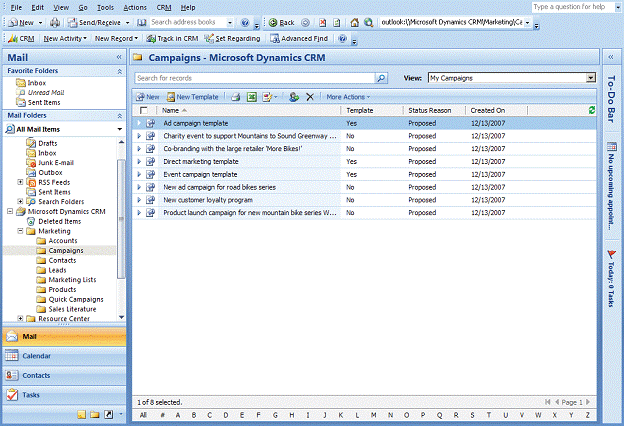
Agent desktop with case management
Resolve Issues Quickly and Accurately
Improve your first-call resolution rates using a searchable, shared knowledge base of articles organized by product and service category, as well as through integrated “Presence” information and instant messaging. Quickly locate and communicate with subject matter experts, managers, or supervisors using contact information that is embedded right in the CRM user experience. Utilize this advanced capability, as well as click-to-chat and click-to-call functionality, with Microsoft Dynamics CRM and Microsoft Office Communications Server 2007 to truly differentiate the customer experience.
Gain Actionable Insight
Measure customer satisfaction during all stages of the service lifecycle either in real-time or as part of a service reporting cycle. Use historical and predictive analytics to raise customer satisfaction, reduce case handling times, improve first-call resolution, or drive targeted cross-sell/up-sell offers to customers. Incorporate service analytics into product improvement initiatives, quality measurement processes, and warranty program optimization.
Third Party Integration
Confidently build and deploy world-class Contact Centers through integration with critical contact center infrastructure products, including leading telephony switch, automated call distribution (ACD), and computer-telephone integration (CTI) products from Microsoft Gold Certified and Certified partners, as well as agent scripting, offer management and workforce management, and call quality solutions.
Integration with the Microsoft Customer Care Framework
Much of the information needed to answer customer questions is scattered across applications such as ERP, billing, and invoicing systems. This information can be surfaced through Microsoft Dynamics CRM using the Microsoft Customer Care Framework to aggregate information from existing systems and channels, to automate tasks, and to accelerate issue resolution. This gives customer service representatives the ability to see all customer interaction information across multiple systems in one place.
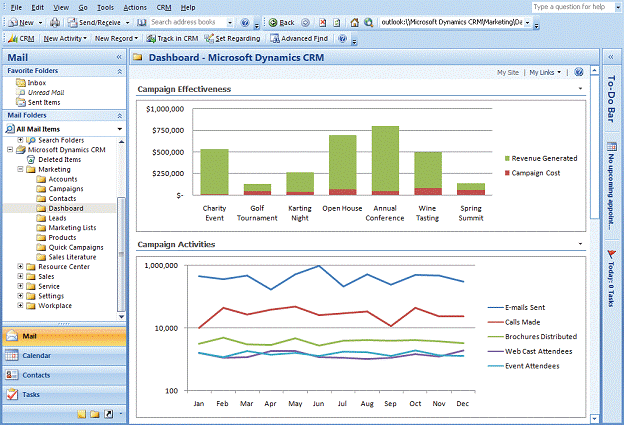
Service Analytics Dashboard (Business Intelligence)
Microsoft Dynamics CRM Customer Service
Choose your user experience: Provide unified customer service using Microsoft Office SharePoint Server, Microsoft Office Outlook, or a user interface completely customized for your business needs, such as a contact center agent desktop.
Manage cases: Create, assign, and manage customer service requests across multiple channels, including phone, e-mail, Web, in-person and emerging channels. Manage cases from initial contact through resolution and automatically associate incoming support inquiries with the appropriate case.
Route and queue cases: Dispatch cases to queues where individuals and teams can access them easily and automatically route them to the appropriate individual, supervisor or expert. Customize service queues so that they match your customer service processes.
Speed problem resolution: Resolve common support issues quickly using a searchable knowledge base. Ensure that published information is complete, correct, and properly tagged using built-in review processes. Build and maintain a solution database that makes it easy for people to find appropriate solutions quickly.
Manage contracts: Create and maintain service contracts within Microsoft Dynamics CRMto manage service level agreements (SLAs), refine business processes, and bill customers accurately. Update the relevant contract information automatically each time a support case is resolved.
Manage and automate e-mail response: Maintain accurate account, contact and service history with automated tracking and response for customer e-mail messages.
Maintain a product catalog: Work with a full-featured product catalog, including support for complex pricing levels, units of measure, discounts, and pricing options.
Schedule appointments and resources: Manage service appointments and resource allocation across your service sites and locations with a single calendar view of service professionals, tools, resources, and facilities. Quickly locate qualified and customer-preferred service professionals and schedule service appointments to deliver value-added services for customers.
Manage services, facilities, and equipment: Model your complete service delivery offerings and resource groupings into Microsoft Dynamics CRMto provide consistent service practices throughout your organization.
Communicate in real time: See the availability and status of co-workers Using Microsoft Dynamics CRM and Microsoft Office Communications Server 2007. Optimize service handling and resource utilization with the power of instant communications.
Automate service processes: Model and deploy robust business automation for customer service using Microsoft Visual Studio® or a wizard-based design environment. Integrate workflows across business systems based on the Windows Workflow Foundation.
Protect data quality: Automatically clean and purge duplicate records to ensure data consistency and integrity.
Turn data into actionable knowledge: Identify common support issues, track service processes, and measure service performance. Use rich reports that provided standard as part of Microsoft Dynamics CRM or easily build customized reports with wizard-based tools that do not require technical resources from IT.
|
For More Information:
|
|
RB Data Services
1565 North Rim Court, Suite 287
San Diego, CA 92111
858-541-1820
info@rbdata.com
|
|